
Curators
Running a publication
Manage a player.gg publication, its contributors, subscribers, and posts.
Set up your publication#
Publication access is currently approved by the player.gg team rather than created from account settings. Apply to become a curator if you want to start a publication or bring an existing publication and its audience to player.gg.
Once approved, you will receive a setup link. Use it to choose your publication URL and add its title, description, bio, profile image, header image, links, and newsletter footer. You can change these later by opening the Curator dashboard, finding Your publications, and selecting Edit.
Header image size#
Publication headers display at approximately 1400 × 225 pixels on a wide screen. Uploading a larger 2800 × 500 pixel image is preferred so it remains sharp on high-resolution displays.
The banner becomes less wide on smaller screens and may crop the sides of the image. Use decorative artwork that still works at different widths, and keep logos, text, faces, or other important details near the center of the banner.
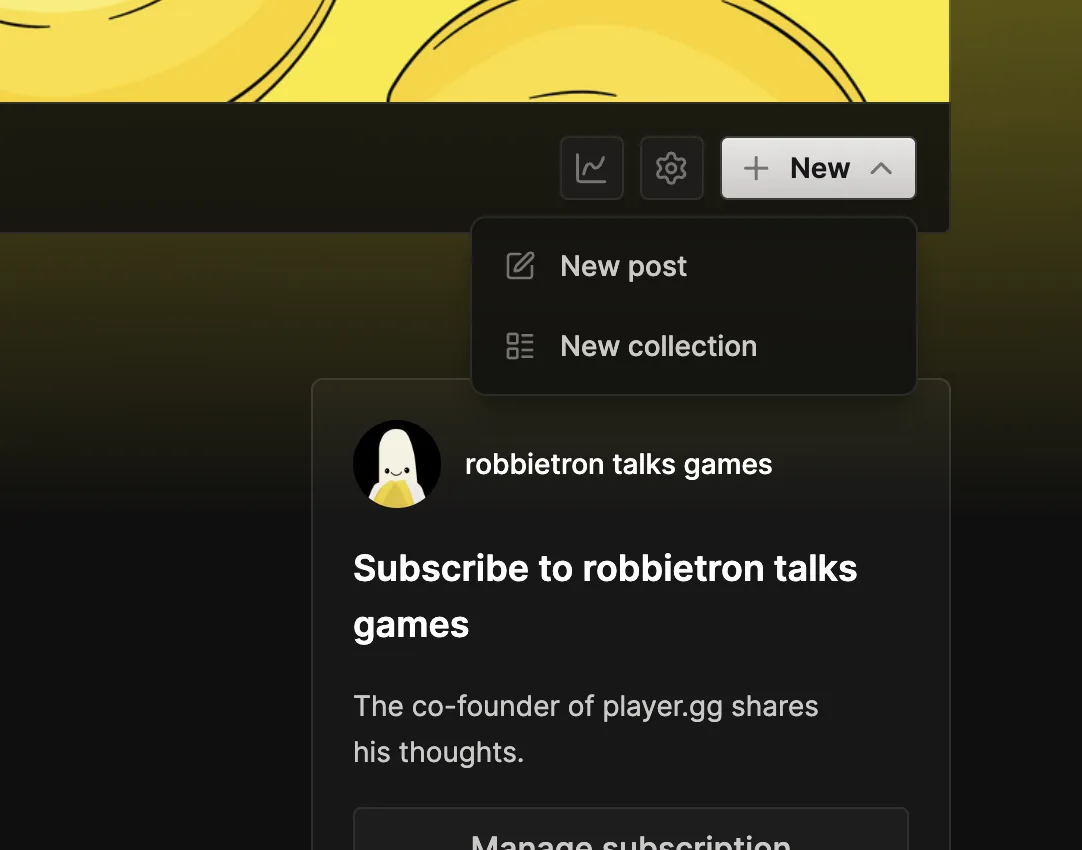
When you have access to a publication, its public page also shows author controls beside the header. Open Activity, select Settings to update the publication, or open New to create a post or collection.
Work with contributors#
Publications can bring multiple curators together under one name. Contributors keep their personal profiles, while work written for the publication appears under the publication’s brand.
When a contributor starts a post, they choose between their own profile and any publication they can write for. Publication posts also get the publication’s newsletter and subscriber options.
Adding and removing contributors is not self-serve yet. Contact curators@player.gg when the people with access need to change.
Manage your audience#
Players can subscribe for free to receive your publication’s new posts. Each time you publish, you can send the newsletter immediately, schedule it, or publish without sending and return to it later.
Use Activity from the Curator dashboard to see new subscribers, followers, and reactions. Open a published post’s analytics to see how that individual story performs.
Offer supporter subscriptions#
Partner Publications can enable monthly and one-time support. From the publication editor, you can set the minimum contribution, describe the free and Supporter tiers, list the benefits, and customize the thank-you page.
Publications connected to a FirstLook community can also let supporters claim a role and any Discord roles attached to it. Once supporter subscriptions are enabled, you can place a Paywall in a post to choose where supporter-only content begins.
Readers manage their own payments and cancellations from the publication’s Manage subscription page.